
A NIKKE top up starts with three choices: the receiving character, its server and the product you want. In GODDESS OF VICTORY: NIKKE, a Gems pack, Monthly Pass and materials set are different purchases. Use this guide to prepare your details, choose the right item and check the order after payment.
What do you need for a NIKKE top up?
The PlayTopUp order form asks for your Player ID and a server. Keep the game open while preparing the order so you can compare both with the character you intend to recharge.
Order detail | What to use |
|---|---|
Player ID | The numeric ID in the receiving character’s profile. |
Server | The matching option: SEA, Global, NA, JP or KR. |
Product | The full name of the Gems pack, Monthly Pass or named set. |
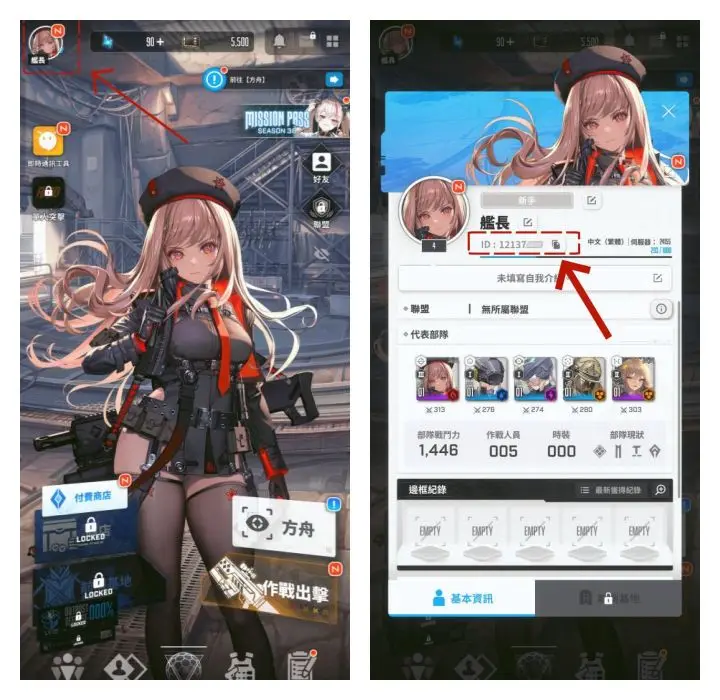
How to find your NIKKE Player ID
- Open NIKKE with the character that should receive the purchase.
- Tap the avatar in the upper-left corner to open the profile.
- Copy the number labelled Player ID or ID, then paste it into the order form.
Use the numeric ID rather than your commander nickname or login email. After pasting, compare it with the profile again, especially if you maintain more than one character.
Choose the server holding your character
PlayTopUp lists SEA, Global, NA, JP and KR. Match the option to the character you are playing. Global is a specific server option; selecting it does not automatically cover every region.
Your current location, preferred website language and payment currency are not substitutes for checking the game server. If you cannot confidently match your character to an option, contact support before paying. A server choice on the purchase form is a delivery detail, not a request to move your character.
Gems, Monthly Pass or a named set?
The NIKKE selector checked for this guide lists these Gems packs:
- 60 + 1 Gems
- 120 + 3 Gems
- 320 + 10 Gems
- 720 + 120 Gems
- 1,500 + 260 Gems
- 2,300 + 400 Gems
- 4,200 + 1,000 Gems
- 6,200 + 1,500 Gems
Read both quantities in the selected product name. For example, the listing “720 + 120 Gems” identifies that pack’s stated quantities; it does not promise an additional first-purchase reward on top.
Product type | What to check before buying |
|---|---|
Gems pack | Match the listed quantities to the amount you want to purchase. |
Monthly Pass | Check its duration, activation and claim conditions in the game. Do not count all pass benefits as an immediate Gems delivery. |
Named set | Match the complete set name and its contents to the item you need. |
Named products currently include Technical Master, Grow Selection Set, Manufacturer Research Set, Class Research Set, Technical Support S I, Technical Support S II, Enhanced Module Set and Manufacturer Backup. A similar price does not make two sets interchangeable.
Check the live selector for availability and the current quote. For a pass or set, read its in-game description alongside the product name before making your choice.
How to order on PlayTopUp
- Open the PlayTopUp NIKKE product page.
- Select the exact Gems pack, Monthly Pass or named set.
- Enter the receiving Player ID and choose its server.
- Review the product, quantity and account details together.
- Choose an available payment method and check the final total, including any displayed fees or discounts.
- Complete payment and keep the PlayTopUp order number.
For repeat purchases, check the saved details again before confirming. Use the order number to follow the purchase rather than assuming a payment confirmation means every delivery step is complete.
How to check the purchase in NIKKE
Once the order is marked complete, open the same character and server. For Gems, check the relevant balance. For a pass or set, check the purchased benefit or item location described in the game. Reopen the game if the display has not refreshed.
If something still does not match, contact PlayTopUp support with the order number, product name, Player ID and server. Describe what is missing and provide a relevant screenshot. Do not send a game password or full card details, and avoid placing the same order again while the first one is being checked.
Frequently asked questions
Is my NIKKE Player ID the same as my commander name?
No. Copy the numeric Player ID from the profile. A nickname or login email does not replace the ID required by the form.
Can I choose Global for any NIKKE account?
Choose the server holding the receiving character. Global is one option alongside SEA, NA, JP and KR. Ask support first if your game version or server does not match the selector.
Does a listed bonus guarantee a first-purchase reward?
The product name states the listed pack quantity. Any separate first-purchase or event reward depends on current game rules and the receiving account’s eligibility; check those conditions before including it in your plan.
Is the Monthly Pass another Gems pack?
It is a separate product with its own duration and claim conditions. Read the current pass description in NIKKE, especially if you want currency available immediately.
What if I entered the wrong Player ID or server?
Contact PlayTopUp promptly with the order number and the correction. The available next step depends on the order’s processing status, so do not assume the details can be changed after delivery.
Where can I see the current NIKKE topup price?
Choose a product on the NIKKE page and review the final checkout total for your payment method. Use that quote rather than a price in an old guide or screenshot.
Ready to choose? Check your Player ID and server, then compare the current NIKKE packs on PlayTopUp.