
Planning a Wuthering Waves top up? Choose a Lunite pack for a currency purchase, or select the Lunite Subscription and check its reward schedule. Before checkout, copy your in-game UID and match the receiving character’s server. This WuWa guide shows where to find both details, how to compare the listed products and what to check after payment.
Prepare your UID and server first
Open the Wuthering Waves account and character that should receive the purchase. Copy the full in-game User ID, or UID, and note the server used to enter that character. Keep those two details together while ordering. A character nickname, email address or community profile name is not a substitute for the UID.
The current PlayTopUp selector offers SEA, Asia, America, Europe and TW_HK_MO. Choose the entry that matches the receiving character. Your current location, the website language and the currency used to pay do not identify its game server.
How to find your Wuthering Waves server
Check the server shown on the game’s title screen before entering Solaris-3. If you play on more than one server, confirm which one contains the character you want to top up before copying its UID.
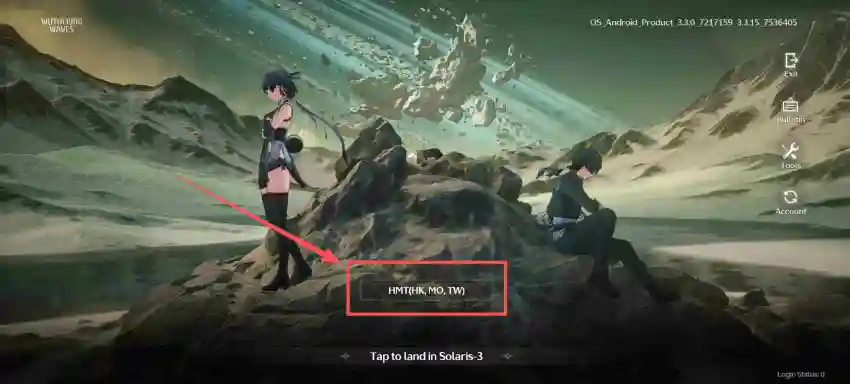
Compare the region name carefully with the checkout selector. If a label is unclear, ask PlayTopUp support to confirm the match before paying rather than choosing the nearest-looking name.
How to find and copy your WuWa UID
- Enter the game with the receiving character.
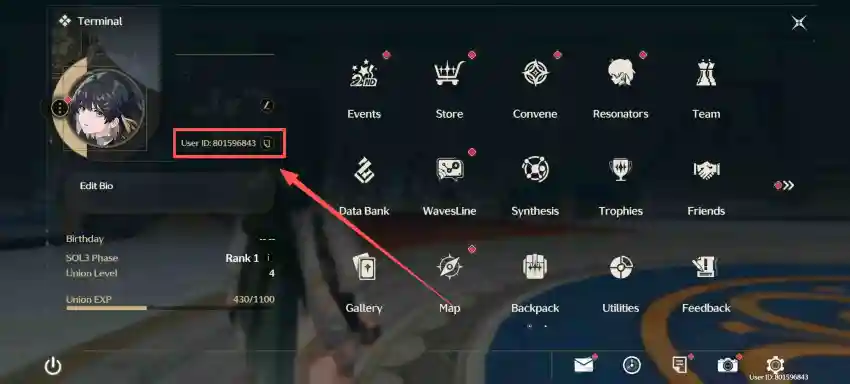
- Open the Terminal menu. The illustrated mobile interface uses the menu icon in the upper-right corner.
- Find User ID beside your character profile and use the copy button.
- Paste the number into the order’s User ID field, then compare every digit with the game.
Choose a Lunite pack or the Lunite Subscription
Start with the item name rather than the largest number or the lowest displayed price. The current currency-pack labels on PlayTopUp are:
- 60 Lunites
- 300 + 30 Lunites
- 980 + 110 Lunites
- 1980 + 260 Lunites
- 3280 + 600 Lunites
- 6480 + 1600 Lunites
The Lunite Subscription is listed separately. Check the live product cards for the current selection, quantity, availability and price before making your choice.
Product | What to check before buying |
|---|---|
Lunite pack | Read the complete quantity, including both parts of a label such as 300 + 30. Compare it with the balance you already hold and the amount you intend to use. |
Lunite Subscription | Read its current reward schedule, active duration and claim conditions in the game. A subscription’s scheduled benefits should not be counted as an immediate currency balance. |
Lunites and Astrites are different in-game currencies. Kuro’s published subscription description explains that Lunites can be exchanged for Astrites and that the subscription includes benefits delivered over time. Read the current reward schedule and purchase conditions for your receiving account in the game before ordering.
Place your PlayTopUp order
- Open the Wuthering Waves product page and select the exact pack or subscription.
- Paste the receiving character’s UID and select its matching server.
- Review the item name, quantity and receiving details together. Check subscription eligibility in the game if you selected that product.
- Choose an available payment method and review the currency, processing charges and final amount before submitting payment.
- Save the order number and payment reference so you can identify the purchase if you need assistance.
This product form uses UID and server. It does not ask for your game-account password. Enter the requested account details on the order page and keep passwords and full payment-card details out of support messages.
Check delivery on the same character
A payment receipt and a completed top-up are separate checks. Review the order status, then open the same UID and server in the game. For a Lunite pack, check the purchased currency balance. For a subscription, check its active status and reward information rather than expecting the whole scheduled benefit at once.
If something is missing, keep the order number, selected item, UID, server and payment reference together. Contact PlayTopUp support with those details. Resolve the existing order before placing another purchase for the same missing item.
Frequently asked questions
Can I choose a server based on where I live?
Use the server that holds the receiving character. A player’s physical location or payment currency may differ from the server chosen in the game.
Does a pack’s “+” amount mean I will also receive a first-purchase bonus?
Read the selected product’s full label as shown. Any separate first-purchase or event reward requires its own eligibility check in the game; do not add another bonus to the displayed quantity automatically.
When does the WuWa top-up bonus reset?
Check the current official in-game announcement and your account’s purchase status. A first order on PlayTopUp does not by itself establish a fresh in-game bonus. Use the date and eligibility conditions in Kuro’s current official notice rather than assuming every version update resets the bonus.
What if I entered the wrong UID or server?
Contact PlayTopUp support immediately with your order number and corrected details. What can be changed depends on the order’s processing status; do not assume a completed delivery can be moved to another character.
Can I use the screenshot’s User ID?
No. It is an illustration. Copy the UID from the character that should receive your own purchase and match it with that character’s server.
Ready to choose? Compare the current Wuthering Waves packs on PlayTopUp, then confirm your UID, server and final total before paying.