
Monster Hunter Outlanders Global (JP/US/EU)
Fast
Safe
24/7
Instructions
Monster Hunter Outlanders Global top up
Choose Crimson Crest Coins for the Global listing. Match the selected edition to your receiving game client before entering account information. A separate Garena product page is available; it is not a server switch for this product.
Read the selected coin pack
The catalogue includes base-plus-bonus labels such as 60 + 7 and 300 + 38 Crimson Crest Coin. Use the full quantity of the selected product. Any extra first-purchase or event benefit needs its own current account and game-rule check.
Receiving account details
The Global form requests your player ID and one of Europe Server, Japan Server or North America Server. Select the server holding the intended character. Copy the ID from that character rather than using a nickname or login email.
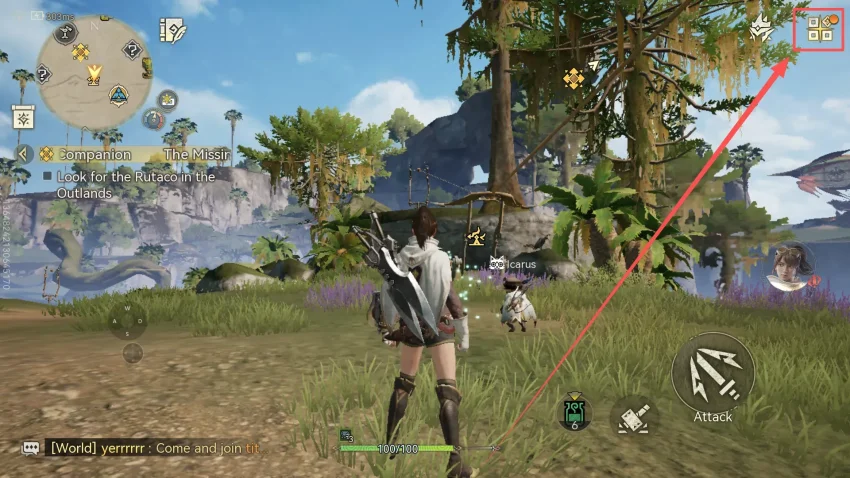
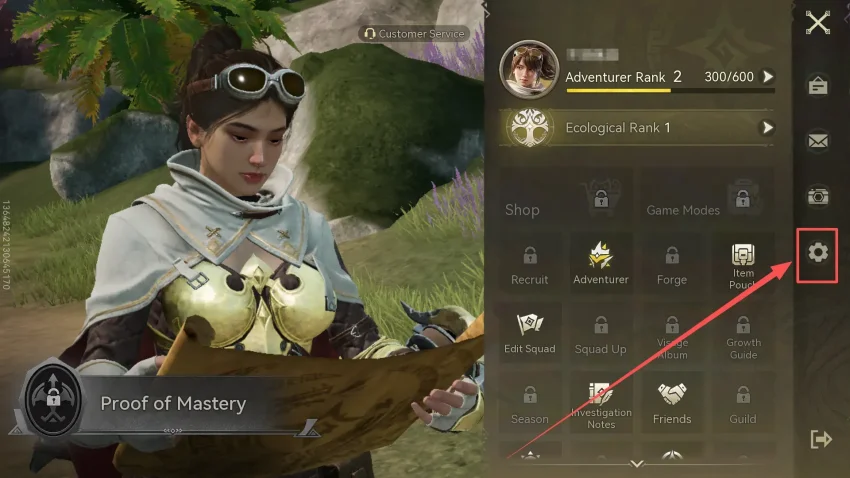
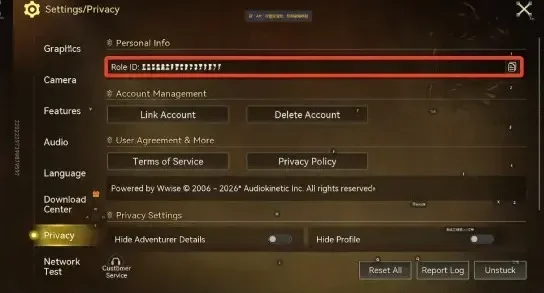
How to order
- Select the exact product and check its current contents and availability.
- Enter the receiving account details required on this page.
- Review the selected product and final checkout amount, then use an available payment method.
- Keep your order number. After completion, check the purchased balance or benefits in the receiving account.
If the order is delayed or the account details are wrong, check its status and contact PlayTopUp support with the order number. Resolve that order before making a duplicate purchase.
What does the Global form require?
+
The receiving player ID and matching Europe Server, Japan Server or North America Server.
Are Global and Garena the same product?
+
They are separate listings. Choose the one matching the client and receiving account; equal coin quantities do not prove compatibility.
Does the website language choose the game server?
+
No. Check the game client and actual receiving character. Where a server field is present, select the server holding that character.
What does a base-plus-bonus amount mean?
+
Read both quantities in the selected product name. It does not automatically promise an additional first-purchase or event reward.
What if I entered the wrong account or edition?
+
Contact PlayTopUp promptly with the order number and correct details. Available next steps depend on processing status.