
目錄
PUBG Mobile UC Top Up — Complete Guide 2026
2026-04-21 13:34:28
.png?x-oss-process=image/format,webp/quality,q_90/resize,w_850)
In this guide, we'll show you the cheapest and fastest way to buy PUBG Mobile UC on PlayTopUp — covering BGMI (India), PUBG Mobile Global, PUBG Mobile Kr (Korea), and all major regions.
What You Need Before You Top Up PUBG Mobile
1. Your PUBG Mobile Character ID
PUBG Mobile uses a Character ID (or Player ID) for UC delivery. Here's how to find it:
On Mobile:
- Open PUBG Mobile
- Tap the Profile tab (top-right corner)
- Look for your Character ID (starts with a number, e.g. 5140001234)
- Write it down — you'll need this for the top up
On PC (PUBG Mobile via emulator):
- Open the character profile in-game
- Your Character ID is displayed below your username
⚠️ Critical: Your Character ID is different from your Pubg ID. Make sure you're using the Character ID (numeric) for top up.
2. Supported PUBG Mobile Versions
PlayTopUp supports UC top up for:
- 🇮🇳 BGMI — Battlegrounds Mobile India
- 🌍 PUBG Mobile Global — Available in most countries
- 🇰🇷 PUBG Mobile Kr — Korea server
- 🇹🇷 PUBG Mobile TR — Turkey server
3. Payment Methods
- Credit / Debit Card (Visa, Mastercard)
- PayPal
- UPI / Paytm / PhonePe (India)
- GoPay / OVO / Dana (Indonesia)
- Touch 'n Go / Boost / GrabPay (Malaysia)
- Crypto (Bitcoin, Ethereum)
Step-by-Step: How to Top Up PUBG Mobile UC on PlayTopUp
Step 1: Visit the PUBG Mobile Top Up Page
Step 2: Select Your Game Version
Choose the correct version:
- BGMI (India)
- PUBG Mobile Global (most countries)
- PUBG Mobile Kr (Korea)
- PUBG Mobile TR (Turkey)
Step 3: Choose Your UC Package
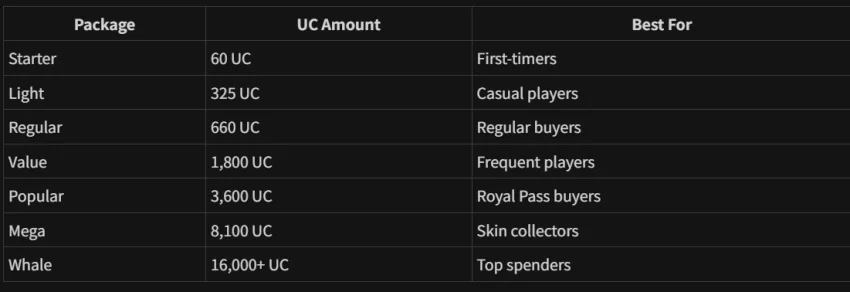
Step 4: Enter Your Character ID
Enter your numeric Character ID carefully (e.g., 5140001234).
Step 5: Complete Payment
Select your preferred payment method and complete checkout.
Step 6: UC Delivered!
Delivery time: Within 3 minutes in most cases. Your UC will appear in your PUBG Mobile account.
PUBG Mobile UC Price Comparison 2026
.png?x-oss-process=image/format,webp/quality,q_90/resize,w_850)
Why PlayTopUp is the #1 Choice for PUBG Mobile UC
✅ 1. Cheaper UC Prices
We offer competitive pricing that often beats the official PUBG Mobile store.
✅ 2. Instant 3-Minute Delivery
No waiting. Your UC arrives in as little as 3 minutes after payment.
✅ 3. Supports All Major Regions
BGMI, Global, Kr, TR — we cover all the major PUBG Mobile servers.
✅ 4. Wide Payment Options
UPI for India players, e-wallets for SEA, crypto for everyone — we accept what you use.
✅ 5. Safe & Secure
- 🔒 SSL encrypted transactions
- 🛡️ No password required — ever
- ✅ No account bans — we're an authorized reseller
Common PUBG Mobile Top Up Issues & Solutions
Issue: "My UC didn't arrive"
Fix:
- Wait up to 15 minutes
- Restart PUBG Mobile
- Check that you entered the correct Character ID
- Verify you selected the correct server region
- Contact PlayTopUp support with your order ID
Issue: "I entered the wrong Character ID"
Fix: Unfortunately, UC already delivered cannot be moved. Double-check your Character ID before confirming!
Issue: "I'm on BGMI but bought Global UC"
Fix: UC for different versions are not interchangeable. Make sure you select the correct version when ordering.
Issue: "Payment was charged but order didn't go through"
Fix: Contact PlayTopUp support immediately with your payment confirmation. We'll resolve it within hours.
Is PlayTopUp Safe for PUBG Mobile?
Yes, 100% safe. Here's why thousands of PUBG Mobile players trust PlayTopUp:
- ✅ We're an authorized UC reseller
- ✅ Zero password sharing — we never ask for your PUBG account password
- ✅ SSL encrypted payments — your financial data is protected
- ✅ 24/7 support — get help anytime via live chat
- ✅ Thousands of happy PUBG Mobile players use us every day
PUBG Mobile UC Top Up — FAQ
Q: How fast is PUBG Mobile UC delivery on PlayTopUp?
A: Most orders are delivered within 3 minutes of payment.
Q: Can I top up PUBG Mobile Global if I'm in India?
A: Yes, but the UC will be for the Global server. Make sure you select the correct version.
Q: What's the difference between BGMI and PUBG Mobile Global?
A: BGMI is the India-specific version operated by Krafton. PUBG Mobile Global is for all other countries.
Q: Do I need my PUBG Mobile password to top up?
A: No! Never share your password. We only need your Character ID.
Q: What's the cheapest way to get PUBG Mobile UC?
A: PlayTopUp regularly offers prices below official store rates. Check our current prices!
Q: What payment methods are accepted for PUBG Mobile top up?
A: Credit cards, PayPal, UPI/Paytm/PhonePe (India), e-wallets (GoPay, OVO, Dana, Touch 'n Go, Boost, GrabPay), and crypto.
Q: Can I gift PUBG Mobile UC to a friend?
A: Yes! Enter your friend's Character ID during checkout to send UC to their account.
Conclusion
Topping up PUBG Mobile UC on PlayTopUp is the fastest, cheapest, and safest way to get your Unknown Cash in 2026. With support for BGMI, Global, Kr, and TR servers, instant delivery, and a wide range of payment options, PlayTopUp is the go-to choice for PUBG Mobile players worldwide.
Ready to get your UC and dominate the battlefield? 👇
See you on Erangel, Sanhok, and beyond! 🎮🏆